scripts etiketine sahip kayıtlar gösteriliyor. Tüm kayıtları göster
20 Ocak 2015 Salı
Linux / Unix : /dev/null Error Redirection and Other /dev files
What is the usage of " command > /dev/null 2>&1"?
/dev/null is a file which takes the input and doesn't print anything in return. /dev/null is kind of a garbage which doesn't have a limit. Therefore we could send anykind of error message in it and not be bothered.
"2" is the STDERR which is standard errors.
"1" is the STDOUT which is standard output.
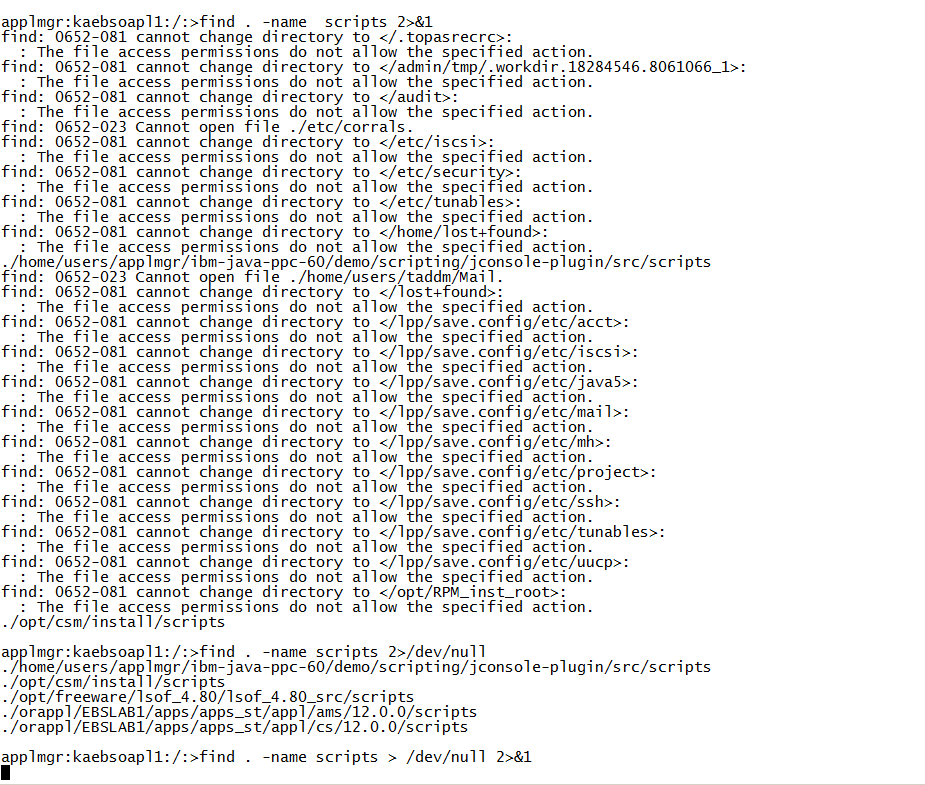
We have 3 kind of output showed in the screenshot below.
find . -name scripts 2>&1: This command has the purpose of searching a file or folder named scripts. it also tells that all the errors to be showed in the screen
find . -name scripts 2>/dev/null: In here we are sending all the errors to our garbage. With this command we are preventing any kind of errors to be showed in the screen.
find . -name scripts > /dev/null 2>&1: This command all together stops printing the messages on the screen.
What else are there besides /dev/null ?
There are a whole lot of files besides it. Our Reference-1 tells all about it. But we can say that /dev/null is the most used one.
References:
1- /dev files - http://www.linux.org/threads/what-are-those-dev-files.4713/
2- Standard output - http://www.codecoffee.com/tipsforlinux/articles2/042.html
21 Temmuz 2014 Pazartesi
Oracle E-Business Suite: Concurrent Requests Performance History - Concurrent Request'lerle ilgili İstatistik Performans Bilgisi
Query About Performance Statistics of Concurrent Requests:
This query gives us the count of daily run concurrents. In addition to that their daily running duration, average running hours and pending hours are also shown. That's how we could diagnose if there had been wrong with the system. In case there was a problem, we could easily detect and investigate the problem on that day or period.
Reference:
1-http://dbavandana.blogspot.com.tr/2013/06/concurrent-manager-queries.html
This query gives us the count of daily run concurrents. In addition to that their daily running duration, average running hours and pending hours are also shown. That's how we could diagnose if there had been wrong with the system. In case there was a problem, we could easily detect and investigate the problem on that day or period.
SELECT TO_CHAR(TRUNC(ACTUAL_START_DATE),'DD-MON-YY DY') STARTDATE,
COUNT(*) COUNT, ROUND(SUM(ACTUAL_COMPLETION_DATE - ACTUAL_START_DATE) * 24, 2) RUNNING_HOURS,
ROUND(AVG(ACTUAL_COMPLETION_DATE - ACTUAL_START_DATE) * 24, 2) AVG_RUNNING_HOURS,
ROUND(SUM(ACTUAL_START_DATE - REQUESTED_START_DATE) * 24, 2) PENDING_HOURS,
ROUND(AVG(ACTUAL_START_DATE - REQUESTED_START_DATE) * 24, 2) AVG_PENDING_HOURS
FROM APPLSYS.FND_CONCURRENT_PROGRAMS P,APPLSYS.FND_CONCURRENT_REQUESTS R
WHERE R.PROGRAM_APPLICATION_ID = P.APPLICATION_ID
AND R.CONCURRENT_PROGRAM_ID = P.CONCURRENT_PROGRAM_ID
AND R.STATUS_CODE IN ('C','G')
AND TRUNC(ACTUAL_COMPLETION_DATE) > TRUNC(SYSDATE-6)
AND TO_CHAR(TRUNC(ACTUAL_START_DATE),'DD-MON-YY DY') IS NOT NULL
GROUP BY TRUNC(ACTUAL_START_DATE)
ORDER BY TRUNC(ACTUAL_START_DATE) ASC;
Reference:
1-http://dbavandana.blogspot.com.tr/2013/06/concurrent-manager-queries.html
19 Aralık 2013 Perşembe
Oracle E-Business Suite: SYSADMIN Yetkisinin Verilmesi - Giving The SYSADMIN Responsibility To Users
Her kullanıcıya "sysadmin" yetkisini verilmesi:
select user_name, user_id
from fnd_user
where user_name like '&username'
/
insert into fnd_user_responsibility(
USER_ID,
APPLICATION_ID,
RESPONSIBILITY_ID,
LAST_UPDATE_DATE,
LAST_UPDATED_BY,
CREATION_DATE,
CREATED_BY,
LAST_UPDATE_LOGIN,
START_DATE,
DESCRIPTION,
WINDOW_WIDTH,
WINDOW_HEIGHT,
WINDOW_XPOS,
WINDOW_YPOS,
NEW_WINDOW_FLAG)
values (
&apps_user_id, -- change this to your APPS user_id and you will have SYSADMIN Responsibility
1,
20420,
sysdate,
0,
sysdate,
1,
1060,
sysdate,
'System Admin',
5.896,
5.427,
-.042,
-.24,
'R');
Etiketler:
e-business suite,
EBS,
Oracle,
scripts,
Sql
Oracle E-Business Suite: Oracle Application Kurulumu ile ilgili Bilgiler SQL - Application Info SQL
Oracle E-Business Suite Kurulumu ile ilgili bilgileri gösteren script:
Aşağıdaki raporda kurulu uygulamaların düzenli bir şekilde gösterilmesi amacıyla yaratılmıştır.
Referanslar:
1-http://www.piper-rx.com/pages/reports_free/fadm001_10.trd
prompt --> Determining information about this Product Group
select product_group_id, product_group_name, release_name,
product_group_type, argument1
from fnd_product_groups;
prompt --> Multi-Org installed?
select multi_org_flag from fnd_product_groups;
prompt --> Uygulamada birden çok dil yüklü mü?
select multi_lingual_flag from fnd_product_groups;
prompt --> Lisanslanmış Ürünler
select decode(a.APPLICATION_short_name,
'SQLAP','AP','SQLGL','GL','OFA','FA',
a.APPLICATION_short_name) apps,
o.ORACLE_username, fpi.status, fpi.install_group_num,
fpi.product_version, fpi.sizing_factor,
fpi.tablespace, fpi.index_tablespace, fpi.temporary_tablespace
from fnd_oracle_userid o, fnd_application a, fnd_product_installations fpi
where fpi.application_id = a.application_id(+)
and fpi.oracle_id = o.oracle_id(+)
order by 1,2
/
prompt --> Kayıtlı Uygulamalar
select application_id, application_short_name,
basepath
from fnd_application
order by application_id
/
prompt --> Kayıtlı Oracle Schema'larını Bulmak için
select oracle_id, oracle_username, install_group_num, read_only_flag
from fnd_oracle_userid
order by 1
/
prompt --> Kurulu olan dilleri bulmak için
select decode(installed_flag,'I','Installed','B','Base','Unknown')
installed_flag,
language_code, nls_language from fnd_languages
where installed_flag in ('I','B')
order by installed_flag
/
Aşağıdaki raporda kurulu uygulamaların düzenli bir şekilde gösterilmesi amacıyla yaratılmıştır.
SELECT report_headings.report_date,
report_headings.sid_name,
fa.application_id appn_id,
decode(fa.application_short_name,
'SQLAP', 'AP', 'SQLGL', 'GL', fa.application_short_name ) appn_short_name,
substr(fat.application_name,1,50)||
decode(sign(length(fat.application_name) - 50), 1, '...') Application,
fa.basepath Base_path,
fl.meaning install_status,
nvl(fpi.product_version, 'Not Available') product_version,
nvl(fpi.patch_level, 'Not Available') patch_level,
to_char(fa.last_update_date, 'DD-Mon-YY (Dy) HH24:MI') last_update_date,
nvl(fu.user_name, '* Install *') Updated_by
FROM applsys.fnd_application fa,
applsys.fnd_application_tl fat,
applsys.fnd_user fu,
applsys.fnd_product_installations fpi,
apps.fnd_lookups fl,
( SELECT to_char(sysdate, 'DD-Mon-YY HH24:MI') report_date,
vd.name sid_name
FROM v$database vd ) report_headings
WHERE fa.application_id = fat.application_id
and fat.language(+) = userenv('LANG')
and fa.application_id = fpi.application_id
and fpi.last_updated_by = fu.user_id(+)
and fpi.status = fl.lookup_code
and fl.lookup_type = 'FND_PRODUCT_STATUS'
UNION ALL
SELECT report_headings.report_date,
report_headings.sid_name,
fa.application_id,
fa.application_short_name,
substr(fat.application_name,1,50)||
decode(sign(length(fat.application_name) - 50), 1, '...'),
fa.basepath,
'Not Available',
'Not Available',
'Not Available',
to_char(fa.last_update_date, 'DD-Mon-YY (Dy) HH24:MI'),
nvl(fu.user_name, '* Install *')
FROM applsys.fnd_application fa,
applsys.fnd_application_tl fat,
applsys.fnd_user fu,
( SELECT to_char(sysdate, 'DD-Mon-YY HH24:MI') report_date,
vd.name sid_name
FROM v$database vd ) report_headings
WHERE fa.application_id = fat.application_id
and fat.language(+) = userenv('LANG')
and fa.last_updated_by = fu.user_id(+)
and fa.application_id not in
( SELECT fpi.application_id
FROM applsys.fnd_product_installations fpi )
ORDER by 5
Referanslar:
1-http://www.piper-rx.com/pages/reports_free/fadm001_10.trd
Etiketler:
e-business suite,
EBS,
Oracle,
scripts,
Sql
15 Temmuz 2013 Pazartesi
Veritabanında En Sık Erişilen Tablolar
Tabloların ne kadar kullanılıp kullanılmadığını görmek için ve bazı gereken veya gerekmeyen tablolarla ilgili bir öngörü oluşturmak için bazen hangi tabloların ne kadar erişildiğini görmek gerekebilir. Bunun için de V$SQL_PLAN tablosu iyi bir referans sağlayabilir.
V$SQL_PLAN içindeki bağlantılar zamanla eskiyeceği için bu sorgudan gelen değerler değişecektir.
SELECT COUNT (*), object_name
FROM v$sql_plan
WHERE operation = 'TABLE ACCESS'
--and object_name='%%'
GROUP BY object_name
ORDER BY COUNT (*) DESC;
Oracle Veritabanı: Bir Tabloda veya Tablespace'de Bulunan İndex'ler
Bir tablonun üzerinde bazen hangi index'lerin olduğunu bazen merak edebiliriz. Veritabanında yer kaplayan nesnelerle ilgili rapor yaparken bu konu ilgimi çekti. Sileceğim tabloların herhangi birisinin üzerinde index var mı yok mu, hangileri üzerinde hangi index'ler tanımlanmış, bunu öğrenmek istedim. Bunun içinde aşağıdaki gibi bir sorgu kullandım. Bununla ilgili kullandığım ana tablo dba_ind_columns idi.
Peki invalid olan index'ler nasıl bulunabilinir?
Aşağıdaki sorgular ile hangi index'lerin invalid olduğunu bulabiliriz.
Invalid olanları bulduktan sonra nasıl rebuild edebiliriz?
Index rebuild etmenin sorgusu görece kolaydır; ancak sorgu çalıştırılmadan önce index'in size'ı ölçülmelidir. Bu sayede index rebuild sorgumuza hem fazladan argüman koyulup koyulmaması gerektiği görülür hem de vereceğimiz sorgunun ne kadar süreceği tahmin edilebilinir.
Index'ler ne zaman rebuild edilmelidir, nelere dikkat edilmelidir?
Index'ler genellilkle yeni data'lar eklendiğinde veya data'lar silindiğinde değişikliklerin etki etmesi için rebuild edilmelidir.
Buna istinaden yine index performansı düşük olanlara ve büyük dml işlemleri yapılan tablolardaki indexlere rebuild işlemi uygulanır.
Index Rebuild Performansı
Index'lerde rebuild edilmeden önce index size'ına bakılmalıdır; çünkü büyük index'ler rebuild edildiğinde uzun süre database resource'u tüketebilir.
Eğer büyük index'ler rebuild edilmek isteniyorsa NOLOGGING argümanıyla çalıştırılmalıdır.
Ayrıca index'ler PARALLEL argümanıyla çalıştırılırlarsa çalıştırılma performansı artar, index rebuild hızlanır.
Index Monitoring:
Index monitoring ile bir index'in kullanılıp kullanılmadığını bulabiliriz. Her ne kadar index monitörleme işi ile database üzerine bir yük eklesek de kullanılmayan index'leri bulup silmek bize yer kazandırabilir.
Monitor başlatma ve bitirme:
Monitörlenen index'leri bulma:
Referans:
http://richardfoote.wordpress.com/category/index-rebuild/
http://jonathanlewis.wordpress.com/2009/06/05/online-rebuild/
http://docs.oracle.com/cd/B28359_01/server.111/b28310/indexes003.htm#ADMIN11722
http://www.dba-oracle.com/t_scheduling_oracle_index_rebuilding.htm
http://www.dba-oracle.com/t_index_rebuilding_issues.htm
http://www.oracle-base.com/articles/10g/index-monitoring.php
Select index_owner, table_name, index_name, column_name
FROM dba_ind_columns
Where index_owner='BERKE'
Order by index_owner, table_name, column_name;
Peki invalid olan index'ler nasıl bulunabilinir?
Aşağıdaki sorgular ile hangi index'lerin invalid olduğunu bulabiliriz.
select * from dba_indexes where status ='INVALID';
select * from dba_objects where object_type='INDEX' and status ='INVALID';
Invalid olanları bulduktan sonra nasıl rebuild edebiliriz?
Index rebuild etmenin sorgusu görece kolaydır; ancak sorgu çalıştırılmadan önce index'in size'ı ölçülmelidir. Bu sayede index rebuild sorgumuza hem fazladan argüman koyulup koyulmaması gerektiği görülür hem de vereceğimiz sorgunun ne kadar süreceği tahmin edilebilinir.
alter index rebuild online;;
veya
alter index rebuild;
Index'ler ne zaman rebuild edilmelidir, nelere dikkat edilmelidir?
Index'ler genellilkle yeni data'lar eklendiğinde veya data'lar silindiğinde değişikliklerin etki etmesi için rebuild edilmelidir.
Buna istinaden yine index performansı düşük olanlara ve büyük dml işlemleri yapılan tablolardaki indexlere rebuild işlemi uygulanır.
Index Rebuild Performansı
Index'lerde rebuild edilmeden önce index size'ına bakılmalıdır; çünkü büyük index'ler rebuild edildiğinde uzun süre database resource'u tüketebilir.
select segment_name,(bytes)/1024/1024 as "MB",(bytes)/1024/1024/1024 as "GB" from dba_segments where segment_type='INDEX' order by "MB" desc;
Eğer büyük index'ler rebuild edilmek isteniyorsa NOLOGGING argümanıyla çalıştırılmalıdır.
Ayrıca index'ler PARALLEL argümanıyla çalıştırılırlarsa çalıştırılma performansı artar, index rebuild hızlanır.
Index Monitoring:
Index monitoring ile bir index'in kullanılıp kullanılmadığını bulabiliriz. Her ne kadar index monitörleme işi ile database üzerine bir yük eklesek de kullanılmayan index'leri bulup silmek bize yer kazandırabilir.
Monitor başlatma ve bitirme:
ALTER INDEX indexa MONITORING USAGE;
ALTER INDEX indexa NOMONITORING USAGE;
Monitörlenen index'leri bulma:
SELECT index_name,
table_name,
monitoring,
used,
start_monitoring,
end_monitoring
FROM v$object_usage
WHERE index_name = 'indexa'
ORDER BY index_name;
Referans:
http://richardfoote.wordpress.com/category/index-rebuild/
http://jonathanlewis.wordpress.com/2009/06/05/online-rebuild/
http://docs.oracle.com/cd/B28359_01/server.111/b28310/indexes003.htm#ADMIN11722
http://www.dba-oracle.com/t_scheduling_oracle_index_rebuilding.htm
http://www.dba-oracle.com/t_index_rebuilding_issues.htm
http://www.oracle-base.com/articles/10g/index-monitoring.php
Kaydol:
Kayıtlar (Atom)